HootSuite

HootSuite is a very useful tool for managing various types of social media profiles. HootSuite allows you to connect multiple social media profiles to one viewing dashboard. I think it is a very useful tool for those that use social media as a way to connect with people. It is easy to see all content on each social media profile on one dashboard. I believe for that soul reason HootSuite is an efficient tool to use. I have attached a few images of the accounts I have connected to my HootSuite account, along with how the dashboard looks for a WordPress.com liked account.

For the WordPress.com account, it will display posts from those you are following, along with the posts you have posted on to your blog. After I send this, my dashboard will update right away to display the new post that was made.

I think HootSuite is a useful tool and essential for all those that use social media to connect with their audiences. http://ow.ly/i/pCkOT http://ow.ly/i/pCkPj
RSS Feed Reader

RSS Feed Reader is a handy blog tool that will help many bloggers that are first starting out. What is RSS? RSS is a technology that is being used by millions of web users around the world to keep track of their favorite websites. In the ‘old days’ web users kept track of updates on a website that was ‘bookmarked.’ One would have to manually return to the website on a regular basis to see what had been added since their last visit. Using RSS gets rid of that step entirely. RSS will notify the web user overtime that a website they choose to track is updated. This will help various new bloggers, as once a new post is made, individuals that follow their RSS feed will be notified and visit the website over and over again, creating more traffic flow.


In order to use RSS Feed, an individual needs to select an RSS Feed Reader. Google and Yahoo both have built-in RSS Feed Readers. Once an account is created for an RSS Feed Reader, individuals will need to subscribe to a websites RSS feed to be notified when a new post is made.


Source

Apple Book

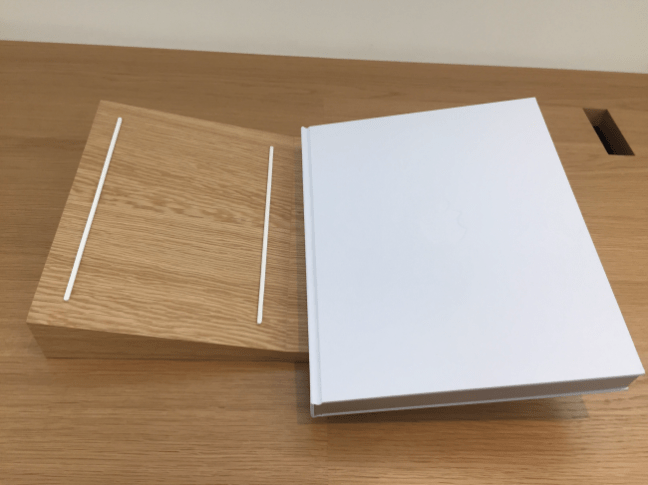
This month (November) of 2016, Apple released their first book know as, Design by Apple in California.  The book includes 300 pages of 450 full-color photographs. The book comes in two different sizes, 10.2 x 12.8 inches and 13 x 16.3 inches. Both sizes have hardback linen covers, along with gilded matte silver edges on all the pages. This book is quite pricey, ranging from $199 to $299 depending on the size wanting to purchase. The introduction is by Jony Ive, photographs taken by Andrew Zuckerman.

This new book has 20 years of history included in it, 20 years of Apple design. The book is your basic picture book, which took Apple more than eight years to create. The history is displayed by way of photographs of all the Apple products within 20 years. This is a visual history spanning iMac to the Apple Pencil, complete with descriptions of innovative materials and techniques. The book is slightly outdated for being released in November of 2016. The book will not include the new line up of Macbook Pros or the iPhone 7, both released before the book. While creating this book, Apple had to go back out and buy it’s old products just to get photographs of them to put into the book.


To learn more about the Apple Book and to go about making a purchase, visit Apple’s website.


Source


2016 Macbook Pro

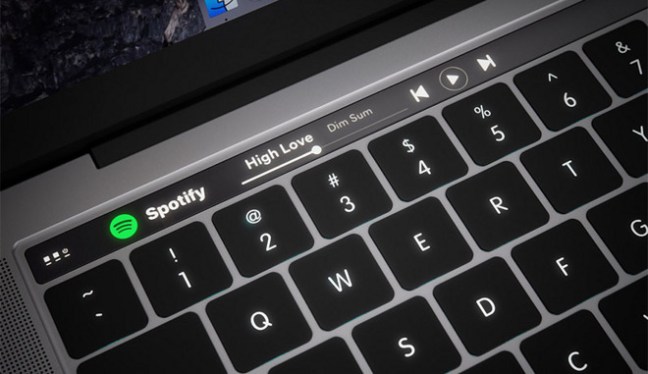
The release of the new Macbook Pro left a lot of Apple consumers questioning whether this would be worth the upgrade or not. Apple added one new feature to the new line of Macbook Pros, that would be what is referred to as the “Touch Bar.” The Touch Bar is a bar on the top row of the keyboard where all of the function keys used to be. One thing individuals that use Youtube on a daily basis might enjoy is that the new Touch Bar allows for you to skip adds; this was found by an individual and submitted on Reddit. Along with this new feature, Apple also removed a few of the ports on the new Macbook Pro, one being the SD card slot. Apple seems to be removing many different ports from their devices, leaving their consumers to purchase adapters to use certain objects.


Apple did release a new Macbook Pro without the Touch Bar for individuals that may not have any interest in the new feature, however, said Macbook Pros still are thinner than previous models, along with having the lesser amount of ports. The new Macbook Pros are certainly worth the upgrade, regardless of the removal of ports. The new Macbook Pros have up to 130% faster graphics, a 67% brighter display, along with being up to 17% thinner. There are two sizes, including 13 inch and 15inch; weighing in at about 3 pounds and 4 pounds.


For more in-depth reviews and specs about this new Macbook Pro, visit Apple’s website.

Source

Introduction

Welcome to my blog. This blog was created for the course Web Campaign Management from the Web Development & Design program offered at Northeast Wisconsin Technical College. Within this blog, I am going to be writing about web-related articles and one of the many tools available to support blogging.